The North Carolina Department of Agriculture and Consumer Services (NCDA&CS) Pesticide Division is transitioning pesticide license renewal notices primarily to email delivery starting this fall. Applicators can verify and update their email address on file with NCDA&CS to help ensure they receive future renewal notices. See the below list of frequently asked questions to help explain this policy.
NCDA Transitioning to Online Pesticide License Renewals for Applicators
(Updated: Oct. 30, 2026, 4:07 p.m.)
What If I Don’t Have An Email Address?
For the 2026 renewal cycle, the NCDA&CS will continue to mail renewal notices to applicators who do not have an email address on file when notices are sent. However, applicators are encouraged to add a current email address to their license record in preparation for future renewals. If you have a family member with an email address, you can add them to your account information as an alternative.
When Will Renewals Be Sent?
NCDA&CS will begin sending renewal notices on November 2, 2026, to applicators who are due to recertify this year.
What Email Address Should I Look For When I Get My Renewal Email?
Pesticide license renewal notices will come from: SPCPDRenewals@ncagr.gov when your renewal is due. Check your inbox and spam or junk folder for your renewal. Consider adding that email to your contacts to help prevent future messages from being filtered. See photo below of an example of the renewal notice:
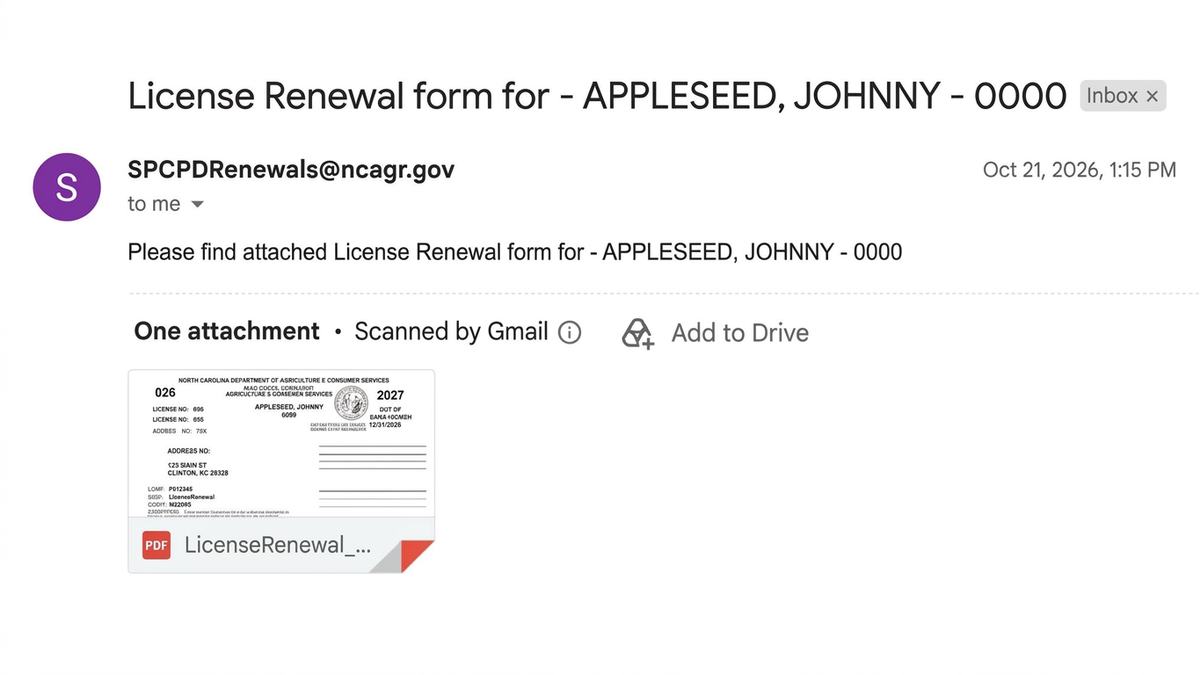
Example of an NCDA&CS Pesticide License Renewal Email.
How to Verify Your Email Address
You can look up your pesticide license online to see whether an email address is associated with your license.
- Visit the NCDA&CS License Search.
- Search for your license using the available search fields.
- Locate your license in the search results and click "Details".
- Check the contact information to see whether an email address is listed.
Need help? If you have trouble finding your license or want to confirm whether an email address is associated with your license, contact the NCDA&CS Pesticide Division at 984-236-4575 or your local Cooperative Extension office.
If an email address is listed, verify that it is correct and that you can access that account. If no email address is listed or the address is incorrect or outdated, follow the instructions below to update your information.
How Do I Update My Email Address Or Add One To My Profile?
Use the NCDA&CS Pesticide License Information Update Form to add or correct your contact information.
Make Sure You Know Your Recertification Year
Private pesticide applicators follow a three-year recertification cycle while other commercial applicators follow a five-year cycle. Even if your next recertification is a year or two away, it is a good idea to verify your email address now so you are prepared for future renewal notices, future regulation updates, and other communication that can be sent to you directly via email.
Again, you can visit the License Lookup tool online to see when your next recertification date is.
Remember that it is your responsibility to keep your pesticide license current and complete recertification by the required deadline.
Join our mailing list!
Enter your email address to receive updates.
Written By